






















ChatGPT is a language model developed by OpenAI that uses deep learning techniques to generate human-like responses to text-based queries. It is trained on a massive dataset of text from the internet, enabling it to understand and generate responses to a wide range of topics. ChatGPT has gained popularity for its ability to hold conversations that feel natural and has numerous practical applications in areas such as customer service, language translation, and content creation. It is built on top of OpenAi’s GPT-3.5 and GPT-4 foundational large language models (LLMs) and has been fine-tuned using both supervised and reinforcement learning techniques. This AI chatbot was released in November 2022 and could reach 1 Million users on the 5th day, and got the 100 Million milestones within 2 months in January 2023. It was never seen such rapid growth in the tech industry, even if we compare it to big brands like Instagram, Twitter, Spotify, etc.
OpenAI is an artificial intelligence research laboratory consisting of the for-profit corporation OpenAI LP and its parent company, the non-profit OpenAI Inc. The company was founded in December 2015 by a group of tech luminaries, including Elon Musk, Sam Altman, Greg Brockman, Ilya Sutskever, John Schulman and Wojciech Zaremba with the goal of developing advanced artificial intelligence in a way that is safe and beneficial for humanity. Initially, the company was intended to be an alternative to companies like Google and Facebook that were heavily investing in AI research, but in a way that was open and transparent. Today, OpenAI is one of the leading AI research organizations in the world, with a mission to develop artificial intelligence in a way that benefits humanity as a whole.
Table of Contents
How Does ChatGPT Work?
A large language model, such as ChatGPT, is a computer program that is trained on a massive dataset of text from the internet. The program uses complex algorithms and statistical models to learn the patterns and relationships between words and phrases in the text. Once trained, the program can then generate new text based on a given prompt or query, using its learned knowledge to predict the most likely words and phrases to use. This enables the program to generate human-like responses to a wide range of topics and queries, making it useful for tasks such as language translation, content creation, and even holding conversations.
ChatGPT Models, and Pricing
Since the “Free Research Preview” period is still going on, using ChatGPT is completely free at this time. This version currently uses the GPT-3.5-turbo language model, which has a default token limitation of 4096, so one interaction with the chatbot must be under 4k tokens ~ 3.000 words, including the inputs and outputs. As a result of the June 13 upgrade, this limit has changed, and you can also choose a model that can handle 16k tokens within one single conversation. With this upgrade, the interaction could be 12.000 words long, even with the free version. During the test with the free version, I never experienced a service outage, although the developer only guarantees service availability when demand is low.
From February 1, 2023, you can also get ChatGPT Plus after paying a separate subscription fee, which is $20 per month. This version already uses the latest GPT-4 language model, which can handle by default 8k tokens ~ 6.000 words, but from the 13th of June 2023, it can be upscaled to 32k tokens ~ 24.000 words within one interaction. This matters a lot if, you want to have a summary prepared from a longer text, or want to get longer content written by the chatbot. OpenAI spent 6 months making GPT-4 safer and more aligned, and based on their internal evaluations, GPT-4 is 82% less likely to respond to requests for disallowed content and 40% more likely to produce factual responses than GPT-3.5. The ChatGPT Plus subscriber not only gets continuous service availability – even if there is a demand peak -, but also gets priority access to the new features. As an example, in a release on the 12th of May 2023, they can start to use advanced web browsing and plugin capability under the beta features option.
There is a range of models available, each with its unique limitations and purposes. Some are designed specifically for coding, while others support functions like text insertion. To navigate through these options more easily, it is essential to refer to the regularly updated official model description available here.
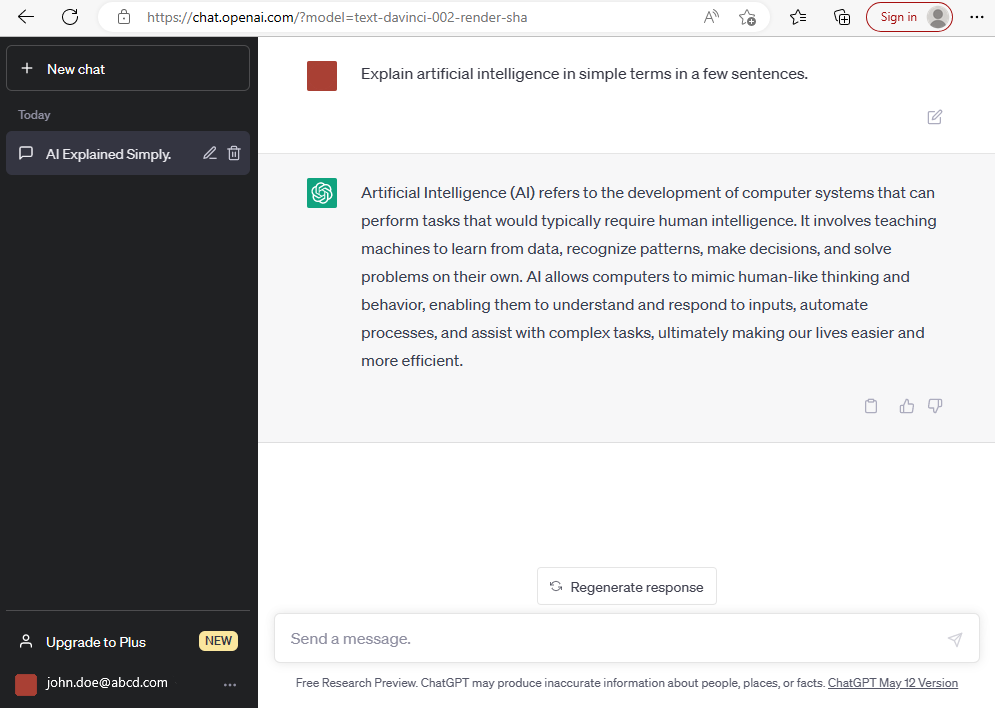
The model currently used by your ChatGPT client can be read from the URL of the browser, and here you can change it to the names indicated in the model descriptions.

As soon as the “free research preview” period ends, the following – usage-based – pricing will come into effect:
- GPT-3.5-Turbo – currently free – will cost: 0,0015$/1k tokens for prompts (question) – and 0,002$/1k tokens for completion (answer)
(that means ~ 375k words interaction with ChatGPT would cost 1$)
- GPT-4 – currently free + $20/month – will cost: 0,03$/1k tokens for prompts (question) – and 0,06$/1k tokens for completion (answer)
(that means ~20k words interaction with GPT-4 would cost 1$)
ChatGPT Sign Up and First Login
To use the tool, you need an OpenAI user account, which you can create at chat.openai.com. For registration, you will need only an email address and a phone number, and a few simple steps to follow.

ChatGPT User Interface
The operator interface is very clean and focused on its main function, which is the chat service. On the top left-hand side, you can see all chat history (if this is not disabled under data protection settings), and here you will find the button to open a new chat and start again the token limitation described above. In the lower-left corner, you can subscribe to the ChatGPT Plus service ($20/month), and here you can change some settings such as the color of the user interface or the chat history option just mentioned.
At the bottom of the screen, in the “Send a message” section, you can write your request or question to which you ask for advice from the tool. As soon as you hit enter, the bot starts to generate the answer and display it on the top of the screen with your prompt too. Since the model is constantly learning, we have the opportunity to give feedback on the accuracy of the answer using the icons next to the answer.
ChatGPT in the Office
In this section, I would like to give some idea of how ChatGPT can be used in the office environment to speed up administrative work. In addition to the general repetitive, time-consuming task, I also try to cover how this tool can work together with the Microsoft Office suite to gain higher efficiency.
Instant Summary
The summarize functionality of ChatGPT can be useful in various situations where you want to condense or extract key information from a longer piece of text. Here are some scenarios where using the summarize functionality might be beneficial:
- Information gathering: You can get key takeaways from a lengthy article or document.
- Creating outlines: You can add your draft content and get back the text highlights.
- Decision-making: Summarize complex reports and quickly assess the situation.
- Learning and studying: Summarizing academic papers and books to capture the essential concepts.
- Communication: You can summarize your own thoughts in written format and send shorter emails.
Teaching
ChatGPT can help you in many areas of learning, starting from compiling the training material to checking your knowledge with a test. The system can compile any learning adi or any set of questionnaires or test from the infinite amount of knowledge available. Let’s see some options where ChatGPT can be your teacher.
- Step-by-step learning guides – getting a kind of schedule with the key milestones.
- To get specific and detailed learning material, use it as a lexicon.
- Prepare a questionnaire or a short test to check your knowledge.
Personal Advisor
If you are unsure about something during your work, ChatGPT can quickly help you with an answer or advice. Imagine that an omniscient assistant is sitting next to you, to whom you can ask any question, and you can be sure that you will receive the best possible answer from an endless database. Well, that sounds good…
- It can rephrase your email if you want to change the tone.
- It can help you prepare for discussion topics.
- Simplifies technical words and terms.
- Ask for advice on any everyday problem.
- Transform a text written in a very professional language into an informal one.
Expert in Excel
ChatGPT can also be a great help when using Microsoft Excel, because, in addition to being able to make suggestions for the entire function library, it can read data from a table and perform operations. Let’s see some examples:
- Ask for function advice for a specific problem.
- Get a simple explanation of a complex function.
- Use for data clean-up, and ask for a data dictionary.
- Get your data set analyzed by AI and ask for a recommendation.
If you want to learn more about the Excel use cases, click here.
PowerPoint Content Creator
You can speed up extremely time-consuming presentation preparation with the help of ChatGPT and PowerPoint. The chatbot helps to create the content, and Microsoft helps to create the professional design… a perfect combination.
- Ask for a proposal for the outline of the presentation.
- Get text content about any general topic, or
- Import your owned long-text content and get transform them into slides.
- As suggestions for the ppt. design, the presentation tone, or key focus points.
Macro Builder
If you have repetitive tasks that you do in the office suite, it might be worth automating them using a Visual Basic macro. You just need to write down the steps that you want to automate, and ChatGPT writes the VBA macro for you. It’s just a few simple steps, and you can save a lot of time.
- Get an existing macro/VBA code explained in simple terms.
- Record macro in Excel, and get code optimized by ChatGPT.
- Get VBA code based on a detailed description written in the chatbot prompt.
- Prepare comments for an existing code, or for the one just generated.
- Request a proposal for code debugging or error analysis.
Limitations of ChatGPT
- Lack of real-time information: ChatGPT’s training data goes up until September 2021, so it may not have the most up-to-date information on current events, news, or developments beyond that time.
- Inability to verify the information: While ChatGPT strives to provide accurate and reliable information, it does not have the ability to verify the accuracy of the information it generates. It’s always a good idea to cross-check and verify important information from reliable sources.
- Sensitivity to input phrasing: How a question is asked can significantly impact the response from ChatGPT. Rephrasing the same question may yield different answers. It’s helpful to be clear and specific in your queries to obtain the desired information.
- Lack of context and common sense: ChatGPT does not possess real-world experience or common sense reasoning. It may provide answers that ar technically correct but not practically applicable or may not understand nuances or contextual information.
- Potential for biased or inappropriate responses: ChatGPT learns from the data it was trained on, which can include biased or controversial information. As a result, it may sometimes produce responses that reflect or amplify these biases. It’s critical to evaluate the information provided and not solely rely on it.
- Limited understanding of legal or financial matters: While it can provide general information and insights, it is not a substitute for professional advice. For complex legal, financial, or investment matters, it’s advisable to consult experts or specialists in the respective fields.
- Inconsistent responses: ChatGPT can sometimes generate different responses to the same question, which can be due to the nature or variations in input phrasing. It’s recommended to review carefully the answers.
Conclusion
In the realm of artificial intelligence, ChatGPT has emerged as a remarkable tool that opens new avenues for communication and knowledge exploration. As an AI language model, ChatGPT, based on the GPT-3.5 architecture developed by OpenAI, exhibits an impressive ability to generate human-like responses and engage users in meaningful conversations. However, it’s essential to delve deeper and critically examine its strengths, limitations, and potential implications.
What is indisputable is the potential for increased efficiency, which we can achieve without any technical knowledge or understanding.
| ChatGPT Pros | ChatGPT Cons |
|---|---|
| Its still Free of Charge | Lack of up-to-date news, events |
| Easy to use | Data not 100% verified |
| Responses in Multiple Languages | Token Limitation |
| 100% Human-like Conversations | |
| Almost Limitless Knowledge |















Comments 6